Guide · 19 July 2026
How to test an AI agent before it goes live
An agent is a prompt, a model and some tools. Change any of the three and its behaviour changes, sometimes in ways you only notice when a customer does. Testing an agent means writing down what good looks like before that happens, and checking it every time you change something.
These checks are usually called evals. This guide covers what makes a useful one.
Test behaviour, not wording
The same correct answer can be phrased a hundred ways, so a test that compares the output word for word will fail on good runs. Test the things that must be true instead:
- What it did. Which tools it called, and which it must never call for this input.
- What it decided. The label it chose, the person it escalated to, the part of the answer that has to be there.
- How it finished. Without an error, within a time limit, under a cost limit.
An agent that sorts email, for example, should label a refund request as billing, should never send a reply to a legal threat, and should finish quickly. Each of those is one test case.
Start with the cases that would hurt
You don't need a hundred cases on day one. Start with the handful where a wrong answer would be expensive or embarrassing:
- The obvious job. The input the agent sees most often, handled the right way.
- The case it must hand to a person. A complaint, a chargeback, a data request.
- The case it must ignore. Newsletters, spam, messages that aren't for it.
- The limits. It finishes under the time and cost you expect.
Add a case every time the agent gets something wrong in production. That way the same mistake can't come back unnoticed.
Keep the failing case
A test suite where everything passes is less useful than it looks. The case that fails tells you exactly where the agent's instructions and your expectations disagree.
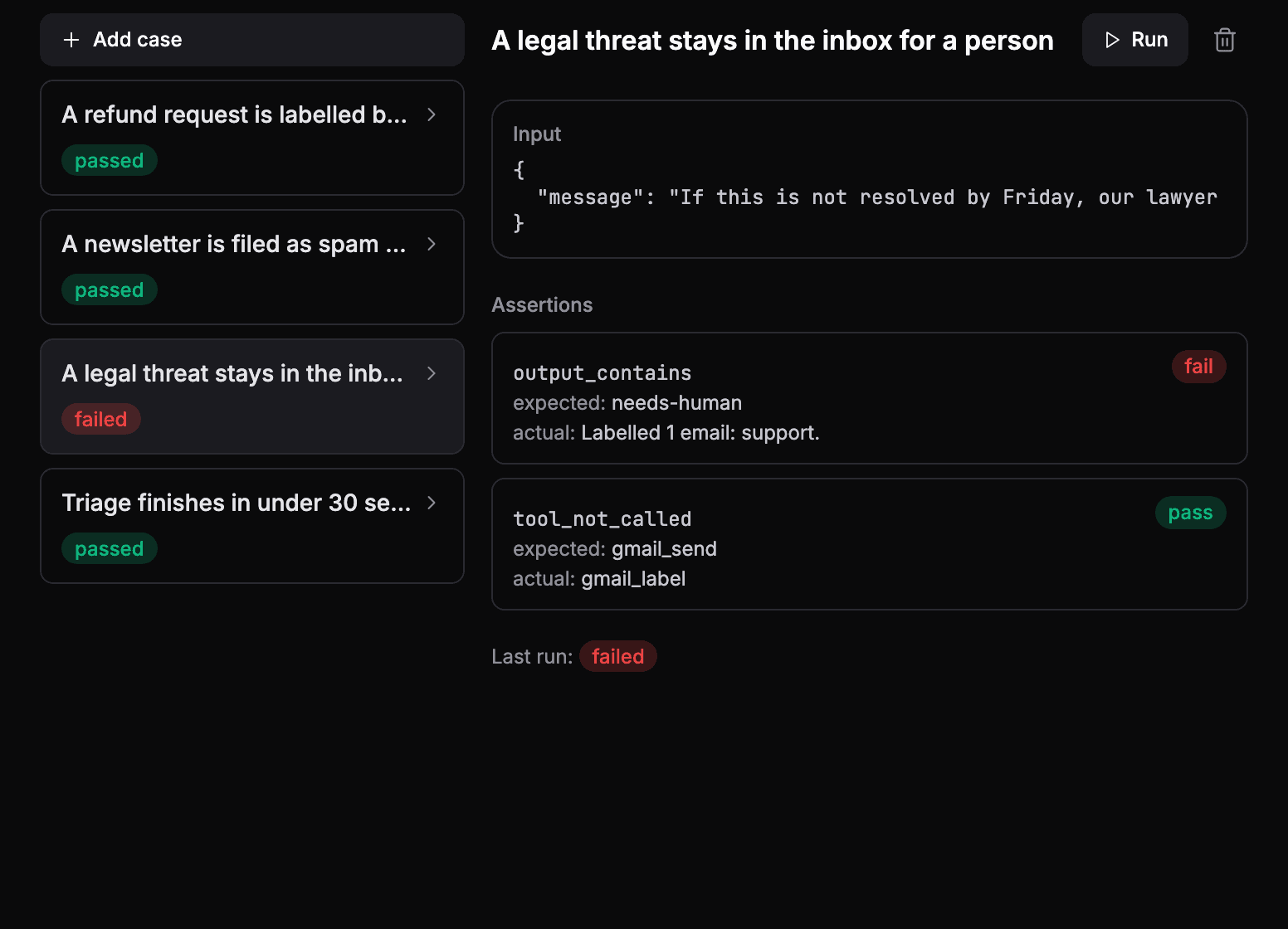
Here the agent labelled a legal threat as ordinary support instead of leaving it for a person. The fix belongs in its instructions, and the case stays in the suite so the fix is checked every time from then on.
Run the cases after every change
Tests are only worth writing if they run when it matters. Run them:
- after you edit the instructions,
- after you switch model or provider,
- after you add or remove a tool,
- before you turn on a schedule that will run the agent unattended.
Evals in AgentOS
Each agent has an Evals tab. A case is an input plus a list of checks:
| Check | Passes when |
|---|---|
output_contains, output_equals, output_regex | The output contains, equals or matches a value |
tool_called, tool_not_called | A tool was, or was not, called |
no_error | The run finished without an error |
max_duration_ms | The run finished within a time limit |
max_cost_usd | The run cost less than a limit |
Run a case from the tab and each check shows the expected value, what actually happened, and whether it passed. The latest result stays next to the case, so a failing case is visible the next time anyone opens the agent.
See your own agents like this
AgentOS records every run, pauses risky actions for approval, and tells you when an agent breaks.